Before you can publish products to eBay through PIM, you must authorize your eBay seller account. PIM uses eBay's secure OAuth authorization process to establish the connection. Once authorization is complete, your eBay API credentials are securely retrieved and configured automatically.
PIM Business Settings
Before connecting eBay, complete your business information under Settings → Business Settings. If your account was configured by the PIM team, this information may already be completed.
Active eBay Account
A verified eBay seller account in good standing with selling privileges enabled.
Business Settings
Before connecting your eBay account, make sure your Business Settings are complete under Settings → Business Settings. If your account was configured by the PIM team, this information may already be be pre-filled.
Authorization Process
Follow these steps to authorize your eBay account with PIM:
Navigate to Settings
Go to the Settings page in your PIM dashboard. You'll find the eBay authorization section under marketplace integrations.
Click Authorize
Click Authorize to begin the connection process. You'll be redirected to eBay's secure authorization page, where you'll sign in and grant PIM permission to access your seller account.
eBay Authorization Interface
Here's what the eBay authorization section looks like in your PIM settings:
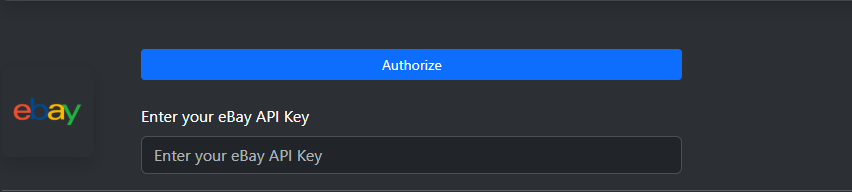
The eBay authorization section in PIM Settings.
Sign In to eBay
On eBay's authorization page, sign in with your eBay seller account credentials. Make sure you're using the account you want to connect to PIM.
Grant Permissions
Review the permissions that PIM is requesting and click "Agree" or "Grant Access" to allow PIM to manage your eBay listings and orders.
Confirmation
You'll be redirected back to PIM, and your eBay account will now be successfully authorized. You should see a confirmation message in your settings.
Permissions Required by PIM
Create and manage listings
Create, update, and remove eBay listings directly from PIM.
Update product information and inventory
Keep product details, pricing, quantities, and inventory synchronized between PIM and eBay.
Access Order Information
Import eBay orders into PIM so you can process and track sales from one place.
View selling fees and transaction details
Retrieve transaction details and selling fees for reporting and analytics.
Manage fulfillment and shipping
Update shipment status and synchronize fulfillment information with eBay.
Access seller analytics and reports
Access account performance data to support reporting and business insights.
Troubleshooting
Authorization Failed
If authorization fails, verify that your eBay account is active and that you completed the authorization process. If the issue persists, contact support.
Token Expiration
eBay tokens expire periodically. PIM will automatically refresh them, but you may need to re-authorize if there are issues.
Access Denied
If you see "Access Denied" errors, check that your eBay account is in good standing and has no selling restrictions.
Re-authorization
You can re-authorize your account at any time by following the same process. This will refresh your connection to eBay.
Security & Privacy
PIM takes the security of your eBay account seriously:
Next Steps
After successfully authorizing your eBay account, you can:
Set Up eBay Business Policies
Create eBay listing profiles to standardize your product listings with consistent shipping, return, and payment policies. You can manage your business policies by visiting eBay Business Policies.
Create Your First Listing
Start listing your products on eBay directly from PIM. Your inventory will automatically sync between systems.
Monitor Orders
Track eBay orders alongside orders from other channels in your unified PIM dashboard.